Sending Files
preparing your design files.
preparing your design files.
We recommend saving out as a high-quality print-ready .PDF or an uncompressed high resolution .tif
If you send us an RGB file, there is a chance that a color shift may occur and you may not be satisfied with your job.
As a general rule should always start and finish your designs in CMYK color mode.
That being said, we can print from RGB files and achieve excellent results.

These colours are in RGB

These are the same colours but in CMYK
Low resolution files may be printed as is or will be placed on hold until we receive new files, slowing your turn-around.
Please ensure your files are 300 dpi.

This image is low resoltion 72dpi

This is the same image but at 300dpi
Bleed must extend further than the cut line. Using one of our templates can help you visualize this. Please keep all text and anything you do not want cut at least .125″ away from the cut line.
When sending an .eps or .pdf, make sure you include crop marks so we can cut the job correctly.
For more information on setting up a bleed area for printing please visit:
When exporting from any program such as Indesign or Illustrator, use these settings to make sure your .PDF files export correctly.
Adobe PDF Preset is set to: Press Quality
Compatibility is set to: Acrobat 4 (PDF 1.3)
Compress Text and Line Art is set to: Off
Grayscale images that are converted to CMYK will have a color shift in the final print. That shift may be green or yellow.
Always check the CMYK values of your grayscale in the final CMYK document. If there are other values other than K in your grayscale image, there is a chance that the color will vary.
To eliminate all values other than K, use your Channel Mixer (adjustment layer) in Photoshop, then click “Monochrome” and adjust accordingly.

Grayscale on screen

Grayscale after printing
When using a blue in your design, always make sure to leave at least a 30% difference in your Cyan and Magenta values.
Blue is close to purple in the CMYK spectrum.
Remember, use a low amount of magenta whenever using high amounts of cyan to avoid purple.
For Example: 100% C 70% M 0% Y 0% K

100% C 100% M 0% Y 0% K – On Screen

After Printing
Yes, but if the border is too close to the cutline, it may be cut off-center slightly.
We cut through many sheets at a time, so watch your borders to avoid an unwanted mistake.
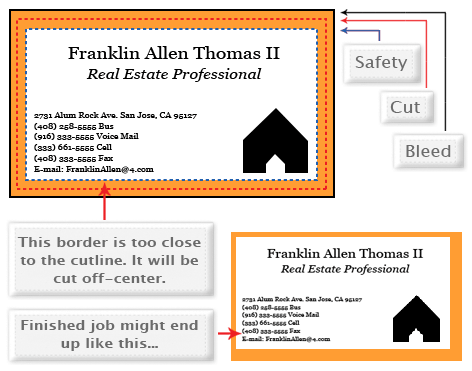
Borders
Rich black is an ink mixture of solid black, 100% K, with additional CMY ink values. This results in a darker tone than black ink alone.
If you print black alone as 100% K, the resulting black may not be as dark as you might like.
We recommend using
C 60 M 40 Y 40 K 100
This will give you a deep, dark, rich black.